SLR CameraPoint and Shoot Camera
left shaded top background

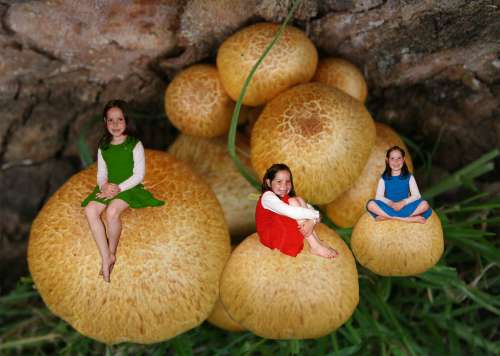
Triplets

 
Triplets - copyright owned by Nana

Triplets

This is one of my first attempts at playing around with photo shop, when I first started using the programme I felt like I would pull my hair out with frustration even books were not much help as they still expected you to know the terminology but with persistance I am getting there. I am enjoying it and look forward to putting up better and better pictures.....


Created by: Nana.
Tools Used: Canon SLR 400D
Created on: October 2006 
Image Views: 184
Average Views per Day: 0.3
Image Number: 31208


Comments:
 
Nana from New Zealand on Oct 22, 2006 at 5:35 PM said:  

Thank you all for your comments and advise, I did think about shodows but did not know where to start. I will give it a go with the advise you have given Doug thank you. Keep an eye out this image may change.... but it may take a wee while to get it right:)....

Doug Hough from California on Oct 22, 2006 at 1:17 PM said:  

Hi Nana, this is a good effort and you've done well here. One thought is to add some shadows below and behind the girls. That way it won't look like they been pasted there. You do this by selecting the background layer and using the burn tool to create the shadows. Set the opacity adjustment of the burn tool (at the top of your menu bar) to around 30%. If the burning process causes an increase in color saturation, use the sponge tool set for "desaturate" at about 20% opacity to correct the colors. If you have any questions about Photoshop, email me directly. Put "Photoshop Question" in the subject line so I won't delete your message as spam.

donwrob from Ohio on Oct 22, 2006 at 12:35 PM said:  

You either have very small kids or very big mushrooms! Great job as your first attempt! I'm the same way, I need to try harder and learn more about all aspects of photo work in the digital dark room. It is fun to play around with them isn't it? Very nice piece of work Nana, Don

Vicki (TravlynWomyn) from Clewiston, Florida, for now on Oct 22, 2006 at 12:13 PM said:  

Great fungi image on its own, and a great imagination for the layering. Alandra has excellent points (per usual - she has wayyyy too much fun tweaking images!) I too, took off a photo-editing program when I couldn'r get comfortable with it and returned to the one I know best - but it's important to learn different programs too as they all have their strong points. keep playing with your layering images - and be patient. Always watch for lights sources when layering as nothing will muck up a good layer effect more than multiple light sources. Doug has one exceptional night shot where the light source changes - but it's valid as the top image could have come from a window or even campfire in front of it which lent credibility to moon shadows in the background and alternate light shadows from the front. Keep up the good start.

Alandra from westcoast Canada on Oct 22, 2006 at 12:44 AM said:  

I think you did very well. Good for you, keeping on with Photoshop, - must give it another try someday, - I didn't like it at all compared with Paint Shop Pro, so took it off my system for the time being, (it came bundled with something else I bought) -- but know what you mean when you start off "on your own" with these programs, as that's how I felt also.


Random Images by Nana
"Reflections" copyright owned by nana
Reflections
"Tree" copyright owned by nana
Tree
"Hells Gate" copyright owned by nana
Hells Gate
 
More Images by Nana

left shaded bottom background
spacer
top search form
bottom search form
spacer
right shaded top background

Popular Better Images


Related Images

Background
Better
Felt
Front
Layering
Light
Off
Photo
Photoshop
Playing
Programs
Shadows
Shop
Start
Tool
right shaded bottom background
spacer
Join The Len Flare
right shaded top background
right shaded bottom background
spacer
right shaded top background

Bookmark this page at:


right shaded bottom background
spacer